

Running a small business often means answering customer questions, preparing marketing content, following up with prospects, and managing paperwork—all in the same afternoon.
AI for small businesses can help with the repetitive work that fills your day. It can draft messages, organize information, summarize conversations, and extract details from documents. Connected business software can then move that information through a workflow.
You do not need to automate everything at once. Start with one frequent task, measure the results, and expand when the process works reliably.
Here are ten practical tasks to consider, with examples of how each could fit into your business.

What Does AI Automation Mean for a Small Business?
There is a difference between asking an AI assistant to write something once and setting up a process that runs whenever new work arrives.
For example, you might manually ask AI to summarize a customer email. An automated workflow could identify new inquiries, generate summaries, and place them in a review queue.
AI handles tasks such as interpreting language or drafting content. Your email platform, customer relationship management system, or other connected software handles the next action.
Some steps can run automatically. Others work best with your approval before anything is sent, published, or changed.
1. Answer Common Customer Questions
Connect answers to your business information
Opening hours, delivery policies, return procedures, and basic product questions are useful starting points for AI customer support.
An AI support agent can answer using a connected knowledge base. Zendesk, for example, supports knowledge-based AI replies and escalation to a human agent when needed.
Start with a small set of questions
For an online shop, begin with your most common delivery and returns questions. Test different ways customers might phrase them.
Keep your policies current and give customers a clear way to reach a person. Questions about exceptions, disputes, or unusual orders should have an escalation path.
2. Sort Incoming Messages
Route inquiries to the right person
AI can classify messages by their content instead of relying only on exact keywords. Zendesk’s intelligent triage, for instance, identifies customer topics, language, and sentiment to support routing rules.
A small service business could organize incoming messages into:
- New sales inquiries.
- Appointment changes.
- Billing questions.
- Technical problems.
Make urgent requests easier to find
A useful workflow would label the inquiry and place it in the appropriate queue. A person can then handle the requests that need judgment.
Check misclassified messages regularly. A system that consistently sends billing questions to sales creates more work than it saves.
3. Prepare Social Media Captions
Turn approved information into draft posts
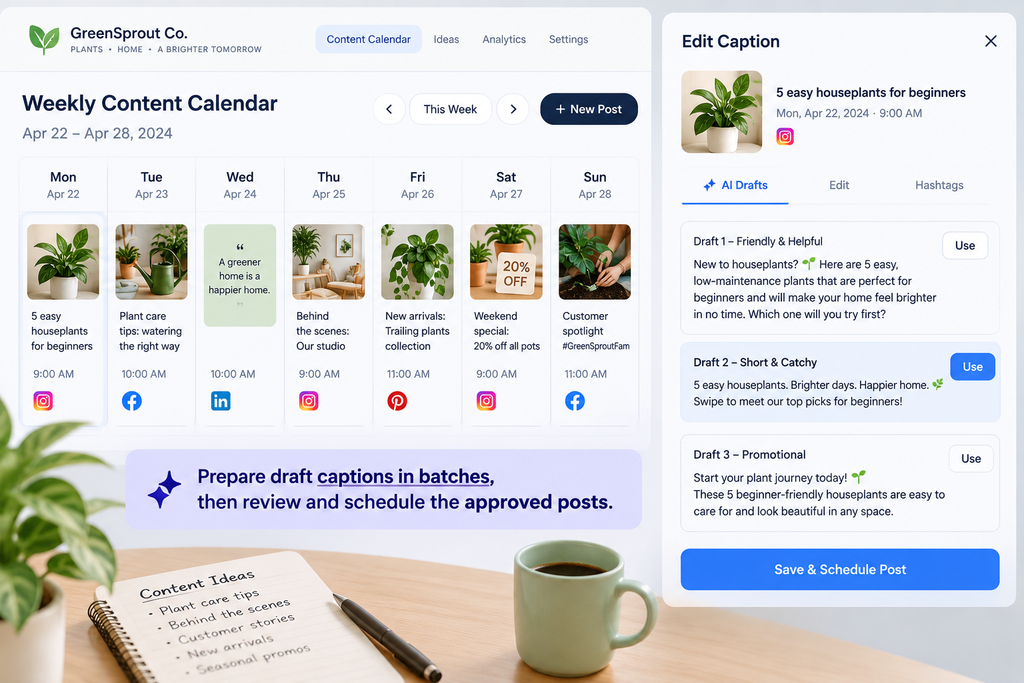
Writing captions from scratch can slow down your marketing. AI tools can generate alternatives from a product photograph and a short description.
Adobe Express supports AI-generated captions within its Content Scheduler, where users can also rewrite, shorten, and edit the suggestions.
Create a repeatable publishing routine
For example, a bakery could provide details about its weekend menu and prepare several caption drafts together.
Choose the strongest versions, check prices and availability, and schedule the approved posts. The AI helps with wording; the scheduler handles publication.
4. Draft Marketing Emails and Follow-Ups
Combine AI writing with email automation
Welcome emails, product announcements, and follow-up campaigns often follow a repeatable structure.
Mailchimp offers AI-assisted email content alongside marketing automation flows and recommendations for send times. Feature availability depends on the plan.
Personalize from information you actually have
A useful example is a welcome sequence for new subscribers:
- A subscriber joins your mailing list.
- Your platform starts an approved sequence.
- Messages introduce your business and relevant products.
- Engagement data helps you assess the campaign.
Use verified product information and appropriate subscriber preferences. Avoid messages that imply you know something about a customer when you do not.
5. Write Product Description Drafts
Supply the details customers need
For businesses with many products, AI can help turn structured specifications into readable descriptions.
Shopify’s description generator accepts details such as product features, keywords, and the desired tone, then lets merchants edit the result.
Check every product claim
Give the tool accurate information about materials, dimensions, care instructions, and intended use.
For example, a furniture seller could supply a chair’s measurements, fabric, and available colors. AI can organize those details into a description, but the seller still needs to check that it has not invented features.
For SEO, use the product name and relevant terms naturally. Answering customers’ questions is more useful than repeating the same keyword.
6. Summarize Meetings and Extract Action Items
Turn conversations into usable notes
Meeting assistants can prepare summaries and identify suggested next steps. Microsoft documents these capabilities in its Copilot meeting tools, including post-meeting summaries, action items, and follow-up email drafts.
Confirm responsibilities before assigning work
After a supplier call, a summary might list:
- Decisions made.
- Questions still open.
- Proposed deadlines.
- Tasks discussed.
Check these against the conversation before assigning responsibilities. A suggestion mentioned during a meeting may not have become an agreed commitment.
Tell participants when you are using recording or transcription tools, and use your approved business systems.
7. Extract Details from Sales Inquiries
Reduce manual copying
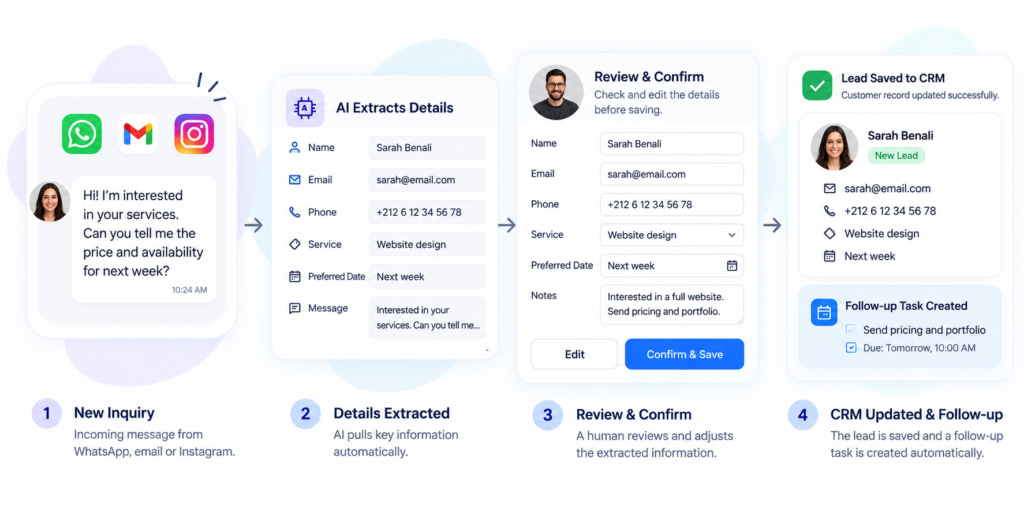
An inquiry may contain a name, email address, requested service, and preferred date. AI extraction tools can identify information in incoming text and make it available to later workflow steps.
Microsoft’s AI Builder documentation demonstrates an automated flow that extracts entities from incoming emails.
Build a reviewable lead intake process
A possible workflow would extract the relevant details, create a draft contact record, and notify the salesperson.
Keep missing fields visibly empty. If the prospect did not state a budget or deadline, the system should flag the gap rather than fill it with a guess.
The goal is a clearer inquiry record that helps a person respond.
8. Extract Information from Invoices
Move document details into a structured format
Invoice-processing AI can extract fields such as the invoice number, vendor, date, amount due, and due date. Microsoft’s AI Builder provides these outputs for use in automated workflows.
Keep payment approval separate
A practical starting point is to create a draft entry for someone to check against the original invoice.
Verify totals, currency, supplier information, and duplicates before the entry reaches your accounting records. Extracting information is one task; deciding whether to pay an invoice is another.
Start by reducing data entry rather than giving the system authority to approve payments.
9. Organize Customer Feedback
Group comments into useful categories
Customer reviews and survey responses become easier to assess when organized by topic.
AI classification models can sort text into business-specific categories, while sentiment tools can identify positive, negative, neutral, or mixed language. Microsoft documents both capabilities in AI Builder.
Read the comments behind the summary
A shop could organize feedback around delivery, packaging, product quality, and service.
Treat these categories as a starting point for investigation. Read representative comments before changing a process: sarcasm, short replies, and ambiguous wording can affect the interpretation.
A useful weekly review identifies recurring concerns and links back to the original feedback.
10. Prepare Weekly Performance Summaries
Turn reporting data into a readable overview
AI can help explain reporting data in plain language. Mailchimp, for example, offers AI-generated performance insights for marketing reports.
Separate results from possible explanations
For a broader business report, provide verified figures from your existing systems and ask for a summary of changes.
The report should distinguish what happened from why it might have happened. If sales fell, the numbers alone do not establish whether pricing, stock availability, or advertising caused the decline.
Check calculations against the source report and use the summary to identify questions worth investigating.
How to Start Using AI for Small Business Automation
Choose one frequent task
Pick work with a clear input, an observable result, and manageable consequences if something goes wrong.
Caption drafts, message sorting, or meeting summaries can make useful pilot projects.
Test before expanding
Run the process on a small sample and compare it with your current approach. Measure:
- Time spent, including review.
- Errors and corrections.
- Software and usage costs.
- Whether the result helps the person using it.
Keep the workflow only if it improves the overall process.
Give the tool limited access
Use approved business accounts and check how the provider handles your data. Connect only the information required for the task.
Set clear boundaries around sending messages, publishing content, changing records, and approving payments.
Frequently Asked Questions
What is the easiest AI task to start with?
Choose a repetitive task you can quickly review, such as drafting captions, summarizing notes, or organizing inquiries. The best first task depends on where your business spends time.
Do I need coding skills?
Some business applications include built-in AI features. Connecting several applications may require additional setup, an automation platform, or technical help.
Will AI-generated content improve my SEO?
AI can help prepare drafts, but it does not guarantee better rankings. Google advises focusing on accuracy, quality, and relevance, and reviewing AI-generated content before publication. Producing large volumes of content without adding value can violate its spam policies.
How much does AI automation cost?
Costs depend on subscriptions, usage, integrations, and the time needed to maintain the process. Compare the total cost with the work it saves after review and corrections.
Choose the First Task to Automate
Look at the work you repeated most often this week. Choose one task, define an acceptable result, and test a small workflow.
AI for small businesses becomes useful when it fits a real process: accurate inputs, clear responsibilities, and results you can check. Expand from there as you learn what works for your team.